Resumen
Este es un proyecto muy interesante y útil. Puede detectar cualquier tipo de objeto en su rango con la ayuda de un sensor ultrasónico. El servomotor ayuda a rotar el sensor ultrasónico para cubrir casi todas las direcciones. Esta es una versión portátil del Arduino Radar porque tenemos una pantalla OLED de 0.96 pulgadas para visualizar los datos. Si algún objeto detectado por el radar, mostrará un símbolo de alerta con un círculo en una línea y la distancia del objeto. Aparte de esto, podemos utilizar un software de procesamiento IDE que visualiza todos los datos en una PC. Si algún objeto detectado por el radar, mostrará una línea roja en el software de procesamiento. El sensor ultrasónico es muy útil en muchos proyectos electrónicos. Lo usamos en medición de distancias y detección de objetos. Entonces, en este proyecto, hemos diseñado un radar portátil que utiliza un sensor ultrasónico, un servomotor y una pantalla OLED para detección y rango.
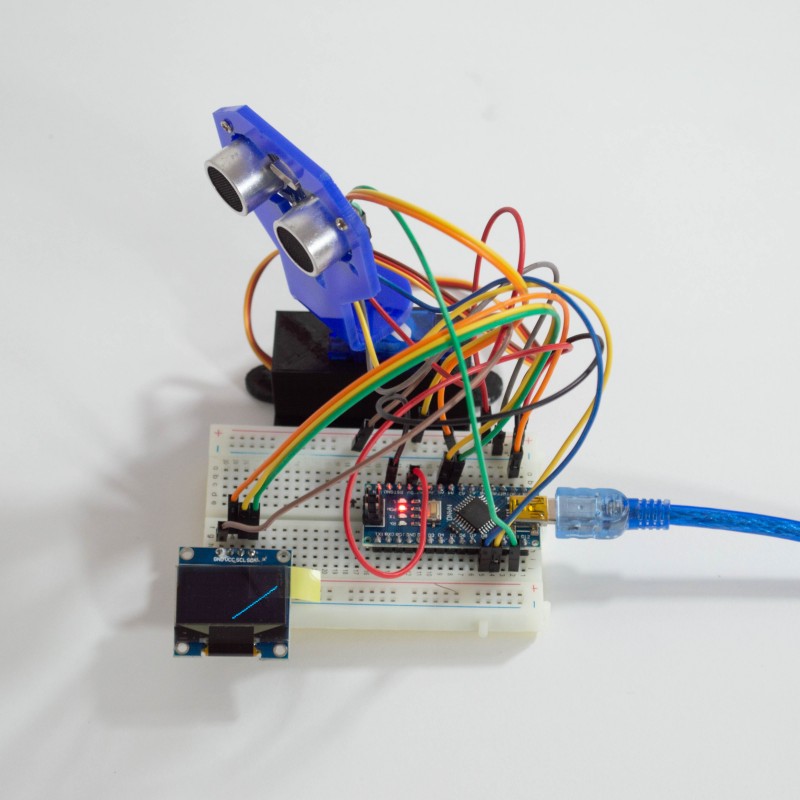
Componentes
- Microcontrolador compatible con Arduino Nano
- Placa de pruebas 400 puntos
- Servomotor SG90 180 grados 1.5Kg
- Sensor Ultrasonico HC-SR-04
- Sujetador para Sensor Ultrasonico
- Sujetador para Servo (Impresion 3D)
- Pantalla OLED 0.96 pulgadas
Diagrama de Conexion
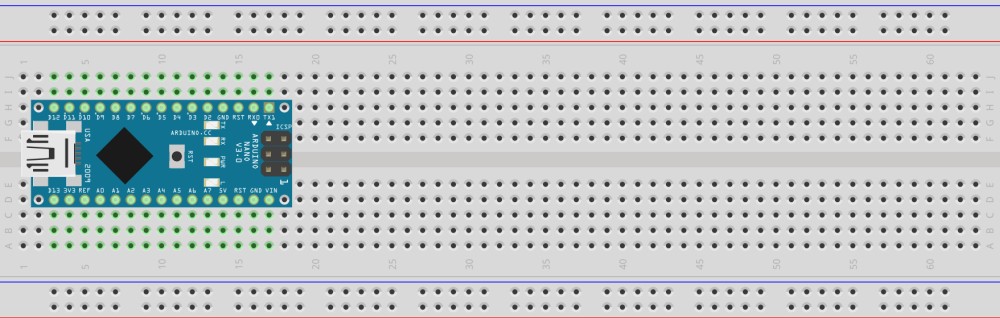
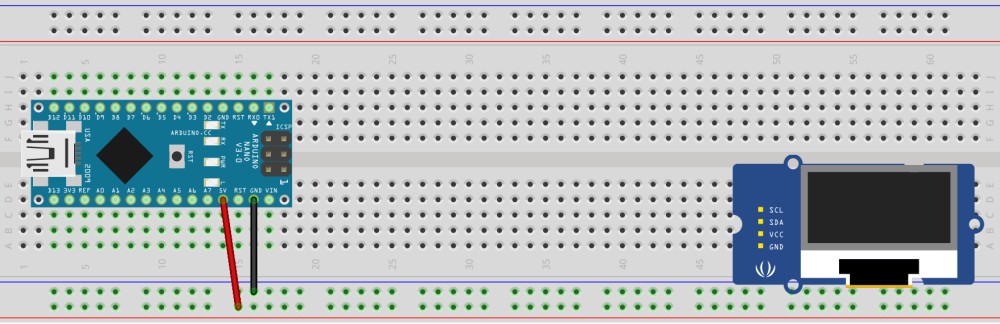
PRIMERO COLOCAMOS EL ARDUINO NANO EN LA PROTOBOARD
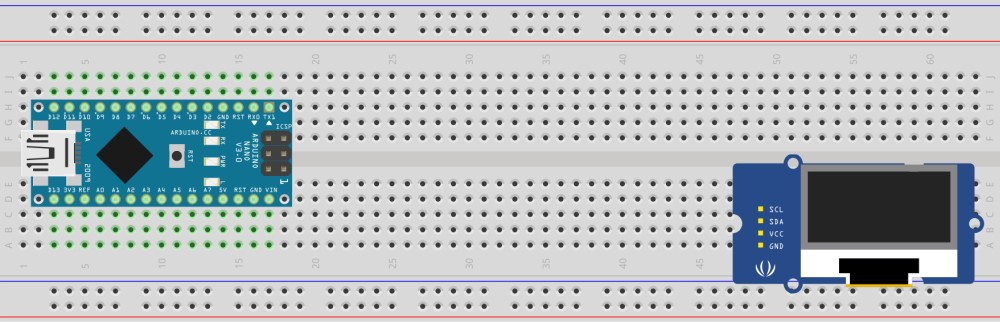
LUEGO COLOCAMOS LA PANTALLA OLED EN LA MISMA
COLOCAMOS LAS LINEAS POSITIVAS Y NEGATIVAS EN LA PROTOBOARD
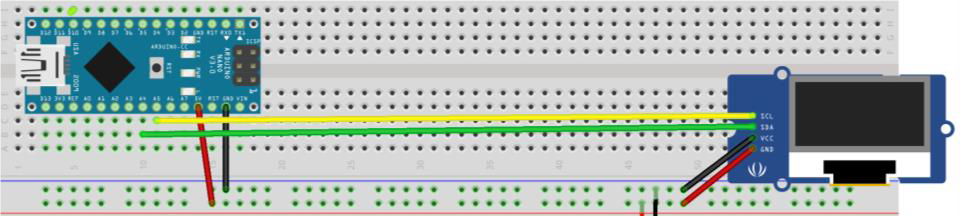
CONEXTAMOS LA PANTALLA OLED AL ARDUINO NANO
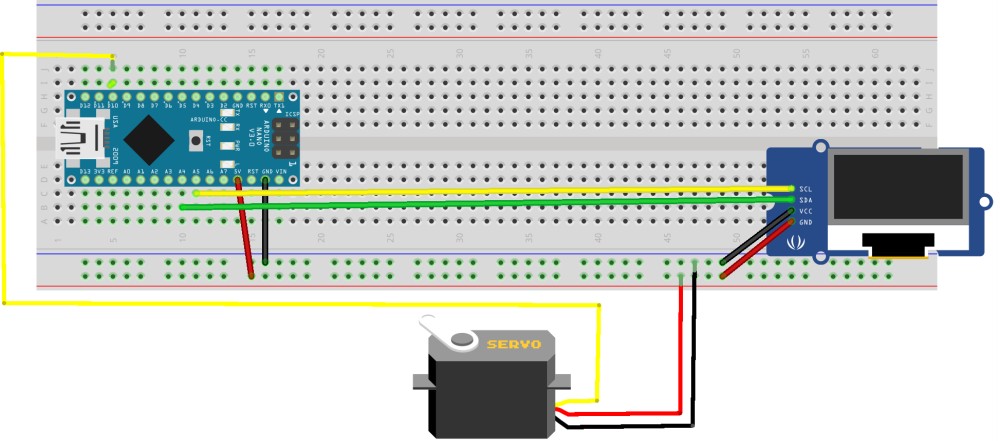
CONECTAMOS LAS ENTRADAS DEL SERVOMOTOR
CONECTAMOS EL SENSOR ULTRASONICO
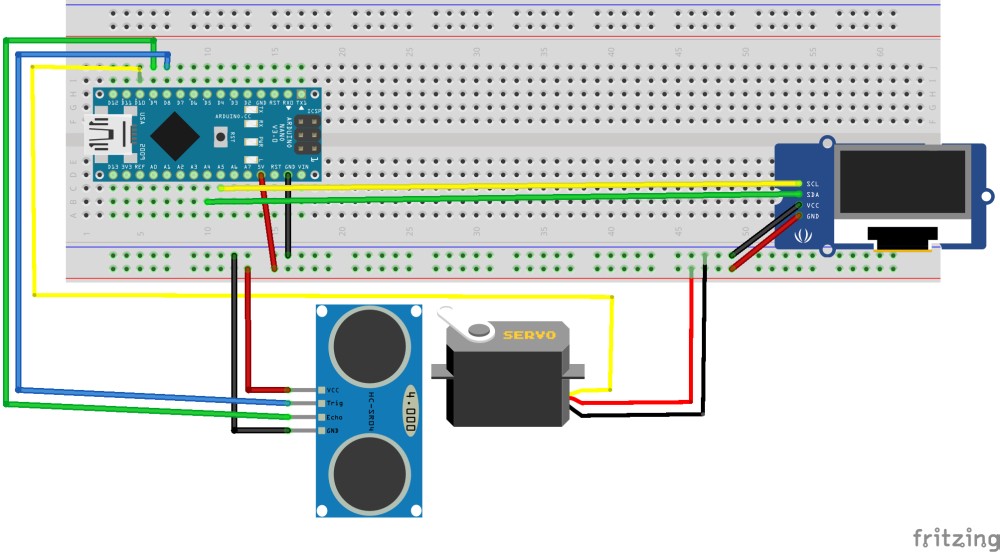
Codigo Arduino
#include <SPI.h>
 #include <Wire.h>
 #include <Adafruit_GFX.h>
 #include <Adafruit_SSD1306.h>
 #include <Servo.h>
 #define Trig 8
 #define Echo 9
 Adafruit_SSD1306 display(-1);
 Servo Servo1;
 void setup()
 {
   // initialize with the I2C addr 0x3C
   display.begin(SSD1306_SWITCHCAPVCC, 0x3C);
   pinMode(Trig, OUTPUT);
   pinMode(Echo, INPUT);
   Serial.begin(9600);
   Servo1.attach(11);
   delay(1000);
   Servo1.write(40);
   display.clearDisplay();
   display.setTextSize(1);
   display.setTextColor(WHITE);
   display.setCursor(20, 10);
   display.println("Arduino RADAR");
   display.display();
   delay(2000);
 }
 long distance, duration, Distance;
 void loop() {
 int i, j, k, l, m, n;  //Define Loop variables
 for (i = 10; i >= 0; i -= 2)         //loop for moving the line from centre left to top left
   {
     int servomap = map(i, 0, 10, 60, 40);   //map the servo values
     Distance = Distance_value();  //get the distance sensor value by calling the function
 // Serial Print for processing IDE
Serial.print(servomap); // Sends the current degree into the Serial Port
Serial.print(","); // Sends addition character right next to the previous value needed later in the Processing IDE for indexing
Serial.print(Distance); // Sends the distance value into the Serial Port
Serial.print("."); // Sends addition character right next to the previous value needed later in the Processing IDE for indexing
if (Distance > 40 )   //if object is out of range (no circle will be displayed on the line
{
display.clearDisplay();
Servo1.write(servomap);
display.drawLine(64, 32, 0, i, WHITE );    //draw a line   display.display();
delay(100);
}
if (Distance >= 0 && Distance <= 40)  //if object is in range
{
 int xmap1 = map(Distance, 0, 40, 64, 0);    //map funtion for draw circle at exact location of the object
int ymap1 = map(Distance, 0, 40, 32, i);
display.clearDisplay();
Servo1.write(servomap);
display.drawLine(64, 32, 0, i, WHITE );    //draw line
display.drawCircle(xmap1, ymap1, 3, WHITE);  //draw object location circle
display.fillCircle(10, 30, 1, WHITE);    //object detection sign
display.fillRoundRect(10, 20, 2, 8, 2, WHITE);  //object detection sign
display.display();
delay(100);
}
 }
   for (j = 0; j <= 128; j += 4) //moving from left to right
   {
     int servomap = map(j, 0, 128, 61, 120);
     Distance = Distance_value();
 //Serial Print for Processing IDE
Serial.print(servomap); // Sends the current degree into the Serial Port
Serial.print(","); // Sends addition character right next to the previous value needed later in the Processing IDE for indexing
Serial.print(Distance); // Sends the distance value into the Serial Port
Serial.print("."); // Sends addition character right next to the previous value needed later in the Processing IDE for indexing
if (Distance > 40 )
{
display.clearDisplay();
Servo1.write(servomap);
display.drawLine(64, 32, j, 0, WHITE );
display.display();
delay(100);
}
else if (Distance >= 0 && Distance <= 40)
{
int xmap2 = map(Distance, 0, 40, 64, j);
int ymap2 = map(Distance, 0, 40, 32, 0);
display.clearDisplay();
Servo1.write(servomap);
display.drawLine(64, 32, j, 0, WHITE );
display.drawCircle(xmap2, ymap2, 3, WHITE);
display.fillCircle(10, 30, 1, WHITE);
display.fillRoundRect(10, 20, 2, 8, 2, WHITE);
display.display();
delay(100);
}
 }
   for (k = 0; k <= 10 ; k += 2) //moving from top right to centre right
   {
     int servomap = map(k, 0, 10, 121, 140);
     Distance = Distance_value();
 //Serial Print for Processing IDE
Serial.print(servomap); // Sends the current degree into the Serial Port
Serial.print(","); // Sends addition character right next to the previous value needed later in the Processing IDE for indexing
Serial.print(Distance); // Sends the distance value into the Serial Port
Serial.print("."); // Sends addition character right next to the previous value needed later in the Processing IDE for indexing
if (Distance > 40 ) {
display.clearDisplay();
Servo1.write(servomap);
display.drawLine(64, 32, 128, k, WHITE );
display.display();
delay(100);
}
else if (Distance >= 0 && Distance <= 40)
{
int xmap3 = map(Distance, 0, 40, 64, 128);
int ymap3 = map(Distance, 0, 40, 32, k);
 display.clearDisplay();
Servo1.write(servomap);
display.drawLine(64, 32, 128, k, WHITE );
display.drawCircle(xmap3, ymap3, 3, WHITE);
display.fillCircle(10, 30, 1, WHITE);
display.fillRoundRect(10, 20, 2, 8, 2, WHITE);
display.display();
delay(100);
}
 }
   for (l = 10; l >= 0 ; l -= 2) //reserve loops
   {
     int servomap = map(l, 10, 0, 140, 120);
     Distance = Distance_value();
 //Serial Print for Processing IDE
Serial.print(servomap); // Sends the current degree into the Serial Port
Serial.print(","); // Sends addition character right next to the previous value needed later in the Processing IDE for indexing
Serial.print(Distance); // Sends the distance value into the Serial Port
Serial.print("."); // Sends addition character right next to the previous value needed later in the Processing IDE for indexing
if (Distance > 40 ) {
display.clearDisplay();
Servo1.write(servomap);
display.drawLine(64, 32, 128, l, WHITE );
display.display();
delay(100);
}
else if (Distance >= 0 && Distance <= 40)
{
int xmap3 = map(Distance, 0, 40, 64, 128);
 int ymap3 = map(Distance, 0, 40, 32, l);
display.clearDisplay();
Servo1.write(servomap);
display.drawLine(64, 32, 128, l, WHITE );
 display.drawCircle(xmap3, ymap3, 3, WHITE);
display.fillCircle(10, 30, 1, WHITE);
display.fillRoundRect(10, 20, 2, 8, 2, WHITE);
display.display();
delay(100);
}
 }
   for (m = 128; m >= 0; m -= 4)
   {
     int servomap = map(m, 128, 0, 121, 60);
     Distance = Distance_value();
 //Serial Print for Processing IDE
Serial.print(servomap); // Sends the current degree into the Serial Port
Serial.print(","); // Sends addition character right next to the previous value needed later in the Processing IDE for indexing
Serial.print(Distance); // Sends the distance value into the Serial Port
Serial.print("."); // Sends addition character right next to the previous value needed later in the Processing IDE for indexing
if (Distance > 40 ) {
display.clearDisplay();
Servo1.write(servomap);
display.drawLine(64, 32, m, 0, WHITE );
display.display();
delay(100);
}
else if (Distance >= 0 && Distance <= 40)
{
int xmap2 = map(Distance, 0, 40, 64, m);
int ymap2 = map(Distance, 0, 40, 32, 0);
display.clearDisplay();
Servo1.write(servomap);
display.drawLine(64, 32, m, 0, WHITE );
display.drawCircle(xmap2, ymap2, 3, WHITE);
display.fillCircle(10, 30, 1, WHITE);
display.fillRoundRect(10, 20, 2, 8, 2, WHITE);
 display.display();   delay(100); }
 }
   for (n = 0; n <= 10; n += 2)
   {
     int servomap = map(n, 0, 10, 61, 40);
     Distance = Distance_value();
 //Serial Print for Processing IDE
Serial.print(servomap); // Sends the current degree into the Serial Port
Serial.print(","); // Sends addition character right next to the previous value needed later in the Processing IDE for indexing
Serial.print(Distance); // Sends the distance value into the Serial Port
Serial.print("."); // Sends addition character right next to the previous value needed later in the Processing IDE for indexing
if (Distance > 40 )
{
display.clearDisplay();
Servo1.write(servomap);
display.drawLine(64, 32, 0, n, WHITE );
display.display();
delay(100);
}
else if (Distance >= 0 && Distance <= 40)
 {
int xmap1 = map(Distance, 0, 40, 64, 0);
int ymap1 = map(Distance, 0, 40, 32, n);
display.clearDisplay();
Servo1.write(servomap);
display.drawLine(64, 32, 0, n, WHITE );
display.drawCircle(xmap1, ymap1, 3, WHITE);
display.fillCircle(10, 30, 1, WHITE);
display.fillRoundRect(10, 20, 2, 8, 2, WHITE);
display.display();
delay(100);
}
 }
 }
 int Distance_value()  //funtion to get the distance value
 {
   digitalWrite(Trig, LOW);
   delayMicroseconds(2);
   digitalWrite(Trig, HIGH);
   delayMicroseconds(10);
   digitalWrite(Trig, LOW);
   duration = pulseIn(Echo, HIGH);
   distance = (duration / 2) / 29.1;
   display.setTextSize(1);
   display.setTextColor(WHITE);
   display.setCursor(100, 25);
   display.println(distance);  //display distance value on oled display
   delay(15);
   display.display();
   return distance; //return the distance value
 }